GTA 6 Controls: Full Xbox Button Layout From Our Playthrough
Seen in our playthrough · Xbox Series X · November 18, 2026 · version not shown in our recording. Spoiler level: none. This page covers menus and button prompts only, with no story.
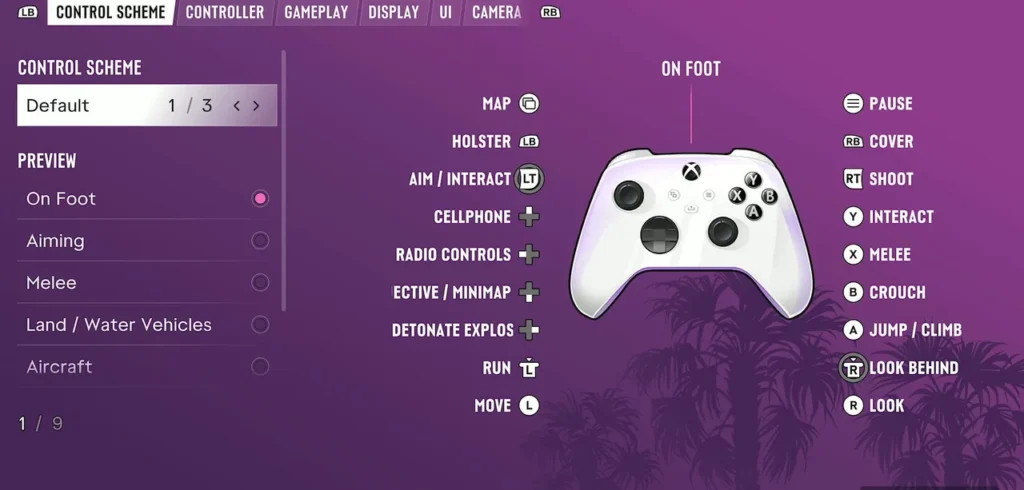
These are the GTA 6 controls as the game showed them to us on Xbox Series X, taken from the Settings › Control Scheme screen and the on-screen prompts during our playthrough. Every line below is something we saw on screen. Where we have not seen a screen yet, we say so at the end.
On-foot button layout (Xbox, Default scheme)
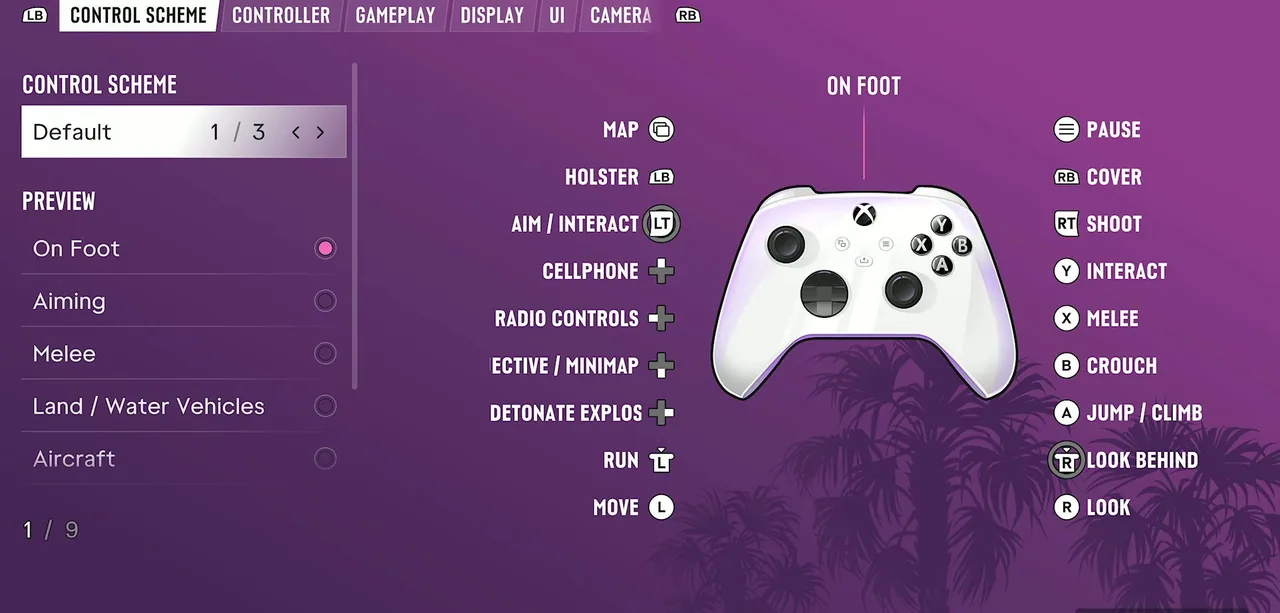
The Control Scheme screen in Settings showed this layout for the Default scheme, on foot:
| Button | On foot |
|---|---|
| Left stick | Move |
| Left stick press (LS) | Run |
| Right stick | Look |
| Right stick press (RS) | Look behind |
| A | Jump / climb |
| B | Crouch |
| X | Melee |
| Y | Interact |
| LT | Aim / interact |
| RT | Shoot |
| LB | Holster |
| RB | Cover |
| D-pad | Cellphone, radio controls, objective / minimap, detonate explosives |
| View | Map |
| Menu | Pause |
A second view of the same on-foot screen lists LB as Loadout, the D-pad as the WAiNK app, Radio Menu, Quick Navigation and Partner Menu, and B as Rest.
The Control Scheme setting read «Default 1 / 3», so there are three schemes to choose from. The screen can preview the controls for On Foot, Aiming, Melee, Land / Water Vehicles, Aircraft, Bicycle, Swimming and Parachute.
Fighting, aiming and stealth
- Melee: the tip reads «press X to fight, hold A to block, press A to dodge».
- Stealth: crouch with B and move quietly to stay hidden.
- Adrenaline: press LB to use the adrenaline from your loadout. A tip says it overpowers your health, stamina and focus for a short time.
- Non-lethal: a tip says incapacitating targets with non-lethal shots takes them out without killing them.
- Weapon wheel: it has two tabs, Weapons and Items, shows what is in hand and shows the ammo count under each gun. Prices and stats are in our GTA 6 weapons guide.
Vehicles, boats and the seaplane
- Seaplane landing: hold LT to slow down as you descend and approach the water.
- Seaplane rudder: hold X or B to use the rudder while flying or on the water. A later tip uses the same buttons to yaw left or right.
- Vehicle info: hold the D-pad to open the WAiNK app on your phone and check a vehicle’s specs and info.
- Trunk: an open trunk offers Clear Trunk and Clear & Stow Bag.
- One tip read «You’re not currently able to start keyless vehicles».
Swimming and diving
- Swim faster: press LS, and press it again to speed up further. Hold LT to strafe in the water or swim backwards.
- Diving: underwater, hold LT or RT and aim around until you locate a signal. Dive and Surface prompts stay on screen.
Other prompts we saw
- Breaking a lock is a minigame: use the right stick to find the right spot and fill the circle quickly.
- Bench press: hold LT and RT to lift the bar and gradually release to lower it.
- Phone: a tip says to use the D-pad to open the phone and make a call.
Control settings worth checking
- Targeting was on Partial (2 of 3): aiming moves towards a nearby target but does not lock on. Aim Assist Strength, Shooting Assist, Drive-By Assist and Quick Draw are on the same page.
- Movement: Movement Speed (Walk), Combat Movement Speed (Fast Walk) and a Stand & Sprint toggle. Fast Walk caps combat movement at a fast walk when the left stick is fully pushed.
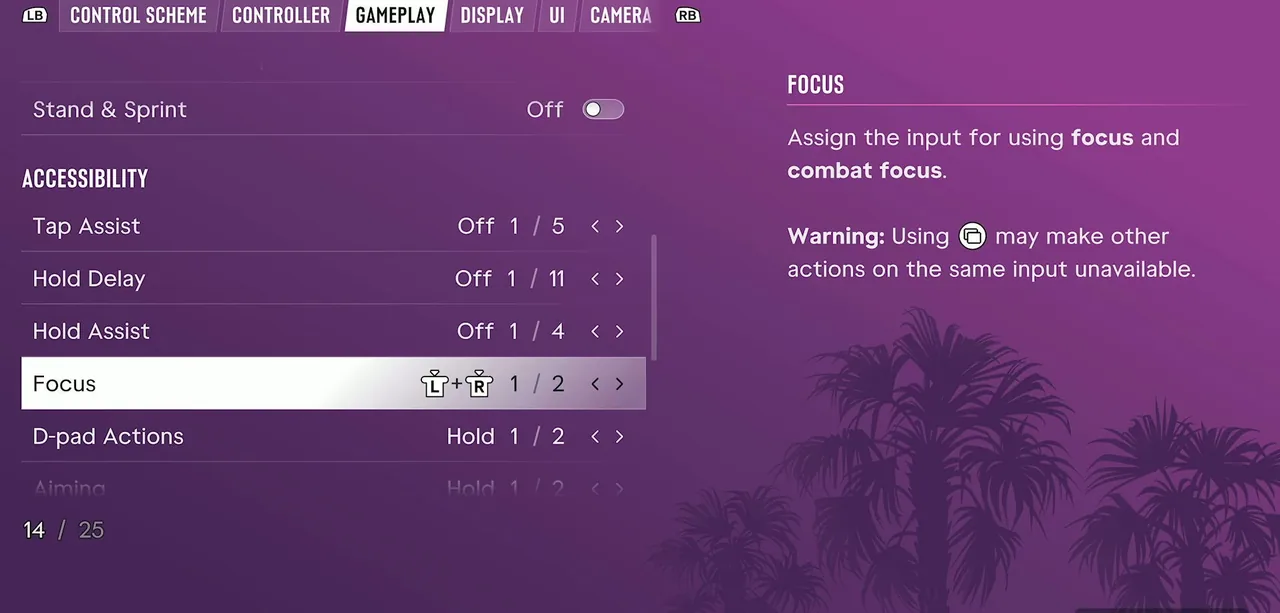
- Accessibility: Tap Assist, Hold Delay, Hold Assist, a Focus input setting and D-pad Actions (Hold).
- Simplified Mini Games simplifies the interactions for exercising, hotwiring and basketball. The same page sets Aiming, Interact, Loadout and Nitrous to Hold.
- Controller: Look Acceleration, Aim Acceleration, Aim Response Curve, and inverted controls for Look, Movement and 3D Map Rotation.
The rest of the settings (HUD, subtitles, audio, display) are in our GTA 6 first hours guide.
What we haven’t checked yet
- The PlayStation 5 layout. Everything above is the Xbox Series X prompt set.
- The vehicle, aircraft, bicycle, swimming and parachute pages of the Control Scheme screen. On our screen the preview stayed on On Foot.
- What the other two control schemes change, and whether buttons can be remapped one by one.
Character cards: Jason Duval and Lucia Caminos. For a DualSense pad, see the GTA 6 controller page. If the game is not open in your region yet, see the release time by time zone. For what each edition includes, see Standard vs Ultimate Edition.
Join the conversation
Sign in to drop your take — Google sign-in supported, takes ten seconds.